
At Square Moon, we monitor and test every evolution of the Claris FileMaker platform to deliver cutting-edge digital transformations for our clients. The launch of Claris FileMaker Pro 2026 is a major release, representing a significant update across platform roadmap acceleration, schema flexibility, developer security, and performance optimizations.
This technical overview examines the key architectural updates and includes results from our development lab testing.
One thing to adress before we dive in is the recent announcements from Claris CEO Ryan McCann who wrote a blog post on the new direction af FileMaker in which it was stated that Claris is “making FileMaker a first-class development target inside agentic coding tools”. This release is not that.
While Filemaker v26.0.1 “lays the groundwork for agentic development” the developer preview for that is planned to be released “later this summer”. With that said, let’s look at the present.
What you will find
- Platform Roadmap and Core Architecture
- The Re-Imagined Layout Workspace and User Experience
- Advanced Schema, Export, and Performance Controls
- Script Workspace and Calculation Enhancements
- Security, Outputs, and Performance Upgrades
Platform Roadmap and Core Architecture
1. Structural Rebranding and the Yearly Release Cycle Shift

The first major shift is visible before you even open a file. Moving away from the traditional numeric versioning track (such as FileMaker Pro 21/22), Claris has officially introduced a predictable, enterprise-focused yearly release cycle. Named Claris FileMaker Pro 2026, this strategy aligns product deployment cadences directly with corporate IT planning cycles. This rebranding is paired with a new platform logo that signals a clean, professional era for the engine.
2. The XML Revolution: Full File Save and Complete Reconstruction
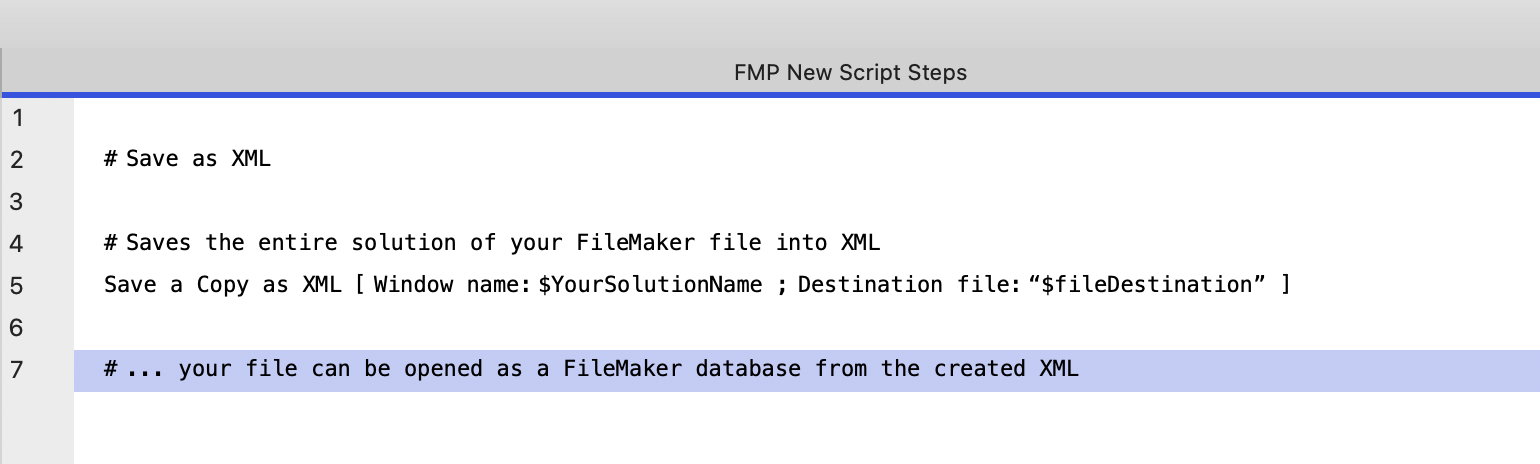
One significant architectural change under the hood is the modernization of the core file structure format. Developers can now utilize an advanced Save as XML command that does more than just output diagnostic logs; it captures the structural blueprint of the application. More importantly, you can now natively restore and reconstruct an entire, functional database file entirely from that XML payload. This provides teams with source control, automated deployments, and backup security.
3. Enterprise Window Tracking: Native Window UUIDs
Managing complex, multi-window solution architectures in enterprise environments has historically required complex scripting to isolate, target, and monitor individual UI windows based on shifting titles. FileMaker 2026 fixes this vulnerability by introducing native Window UUIDs. Every window initialized by the runtime engine is assigned a persistent, unique identifier string, allowing developers to cleanly track states, coordinate data updates, and target explicitly scoped window objects safely across complex workspaces.
The Re-Imagined Layout Workspace and User Experience
4. The Inspector Overhaul: Streamlined 2-Tab Efficiency
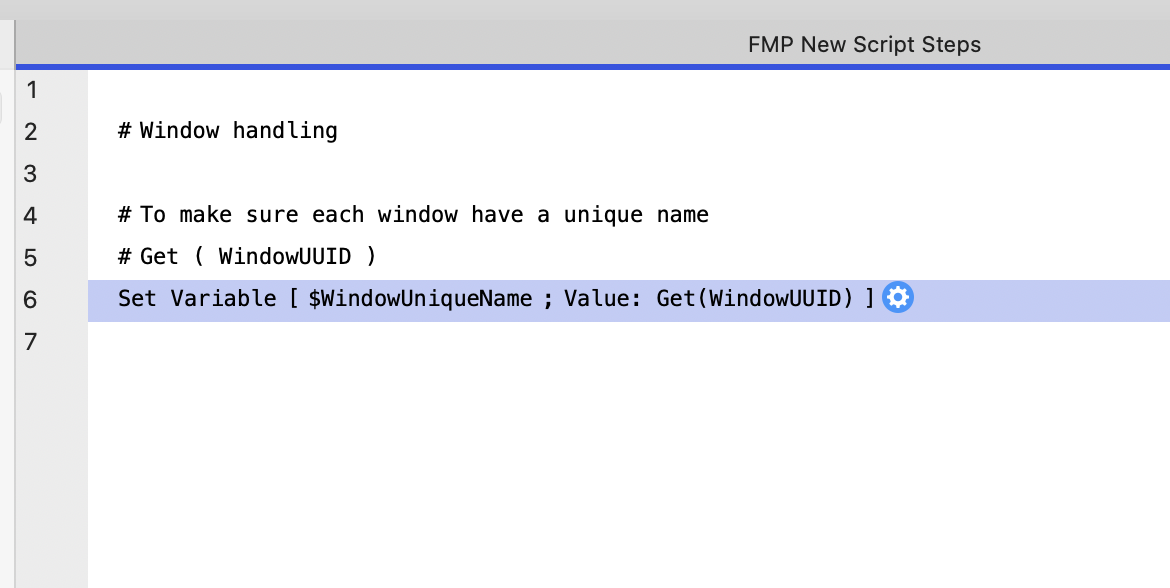
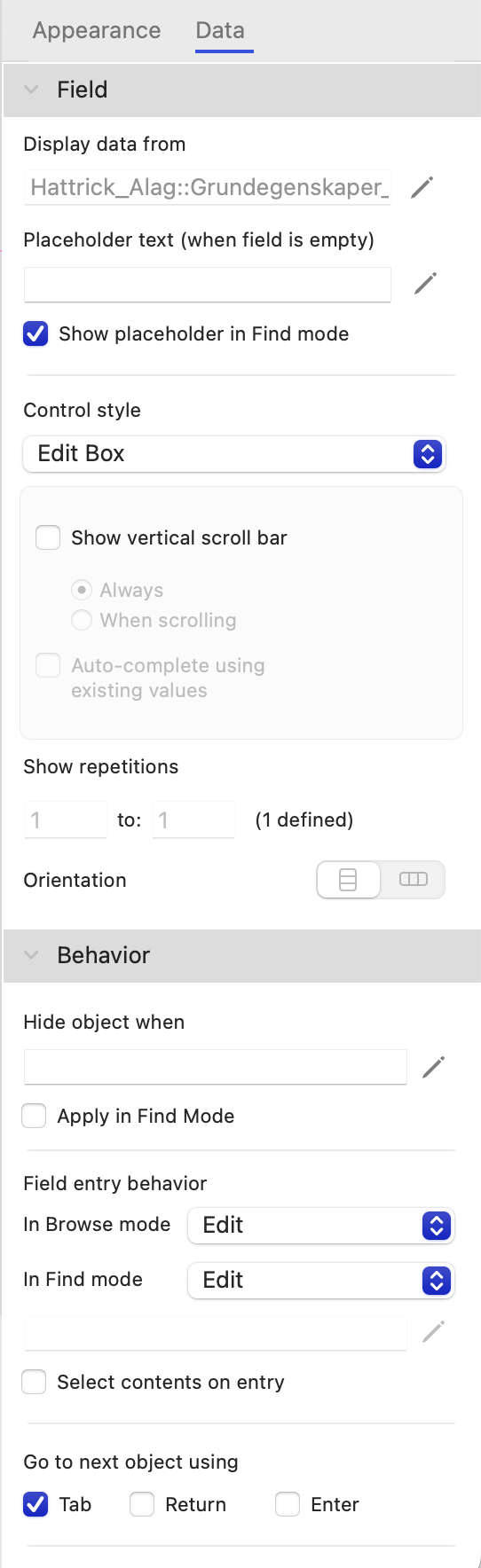
To accelerate interface building speeds and eliminate constant tab-switching fatigue, the Layout mode Inspector palette has been completely engineered from 4 tabs down to 2 hyper-focused tabs. By consolidating structural formatting, dimensions, and styling rules alongside behavioral triggers and data mappings, the layout workspace provides an incredibly smooth, context-aware design loop that dramatically speeds up UI implementation.
5. Dynamic Calculation-Driven Field Entry Behavior
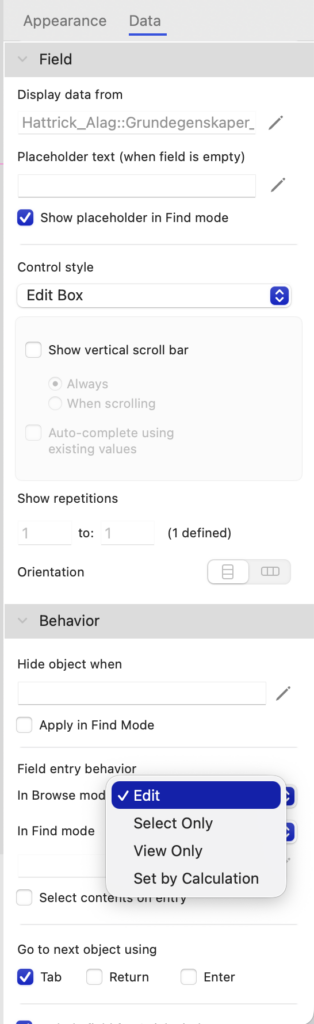
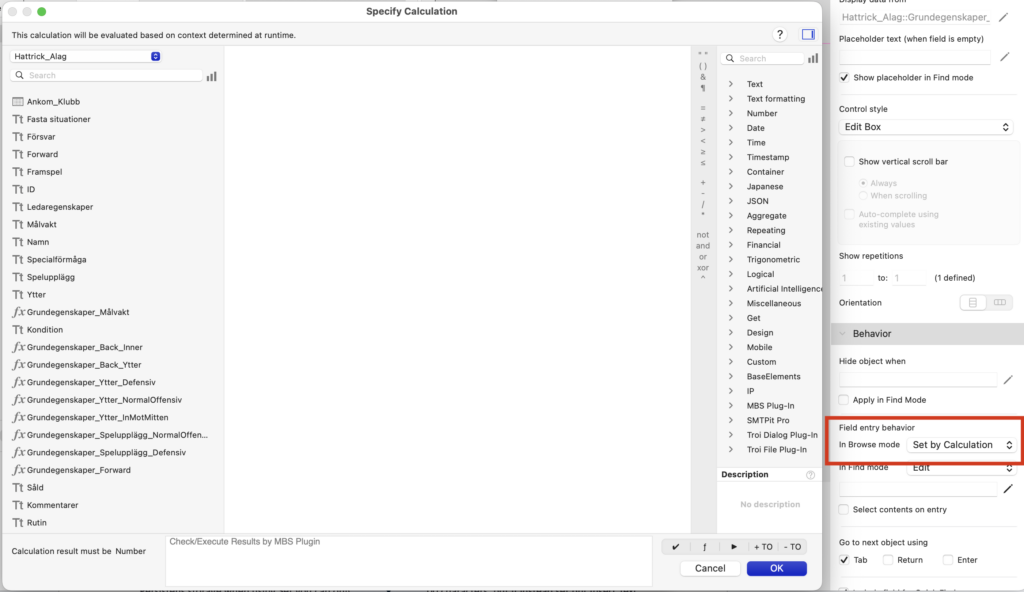
One of our favorite new feature additions is the transformation of field accessibility rules. Previously, determining whether an end-user could click into a field in Browse Mode or Find Mode was controlled by rigid, hardcoded checkboxes in the Inspector. In FileMaker 2026, Field Entry behavior can be driven dynamically via the calculation engine. This allows developers to pass runtime contexts—such as user privileges, document statuses, or record validation states—directly into an evaluation expression to selectively lock or open layout access in real time without writing heavy, multi-step layout masking scripts.
6. Explicit Layout Default View Controls
Configuring user navigation layouts requires absolute precision over how data views present themselves on initial layout load.
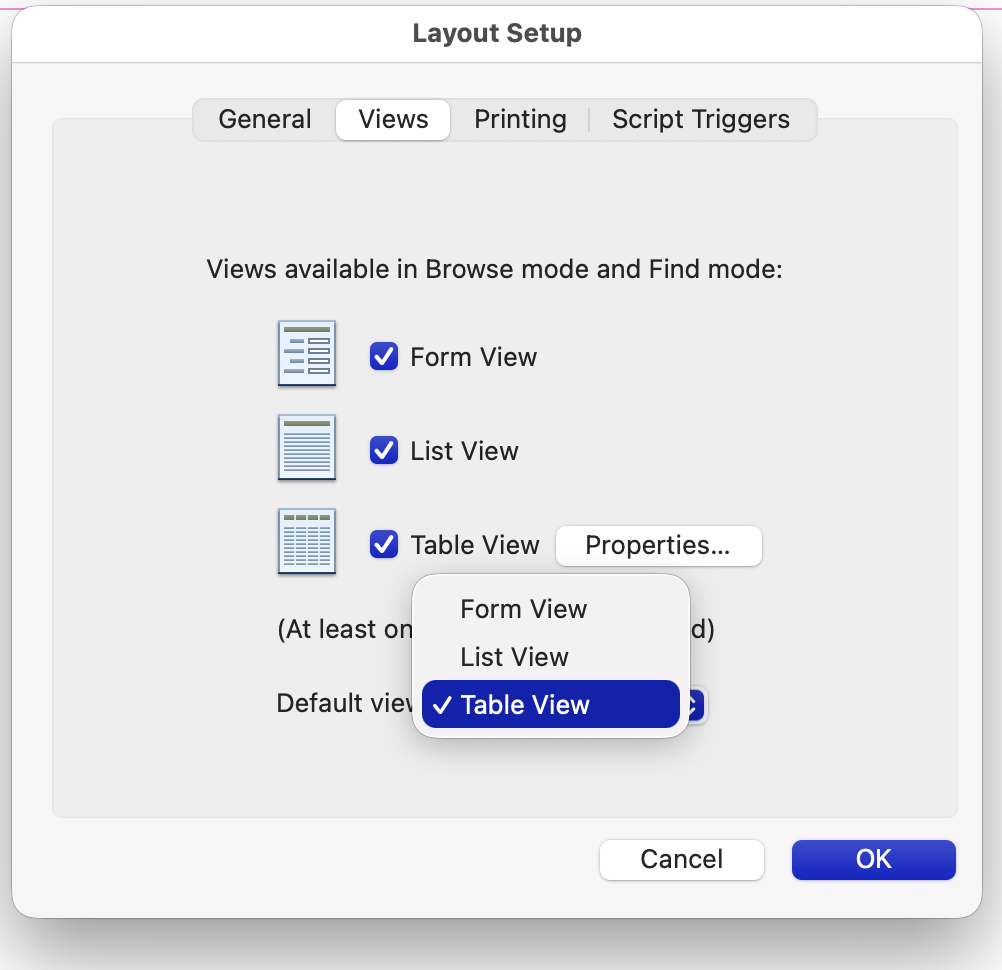
Inside Layout Setup -> Views, developers are given clear visual priority configurations via an explicit Default view selector dropdown menu window. Whether you need to enforce a table layout to strictly initialize in Table View or List View while keeping form view selectively active for secondary user triggers, this configuration update minimizes visual rendering bugs and enhances standard user interface design processes.
7. Custom Dialog Positioning Coordinates Control
Native Show Custom Dialog windows have historically suffered from rigid, automated center-screen placement rules that often blocked critical data layouts beneath them during multi-step data entry tasks.
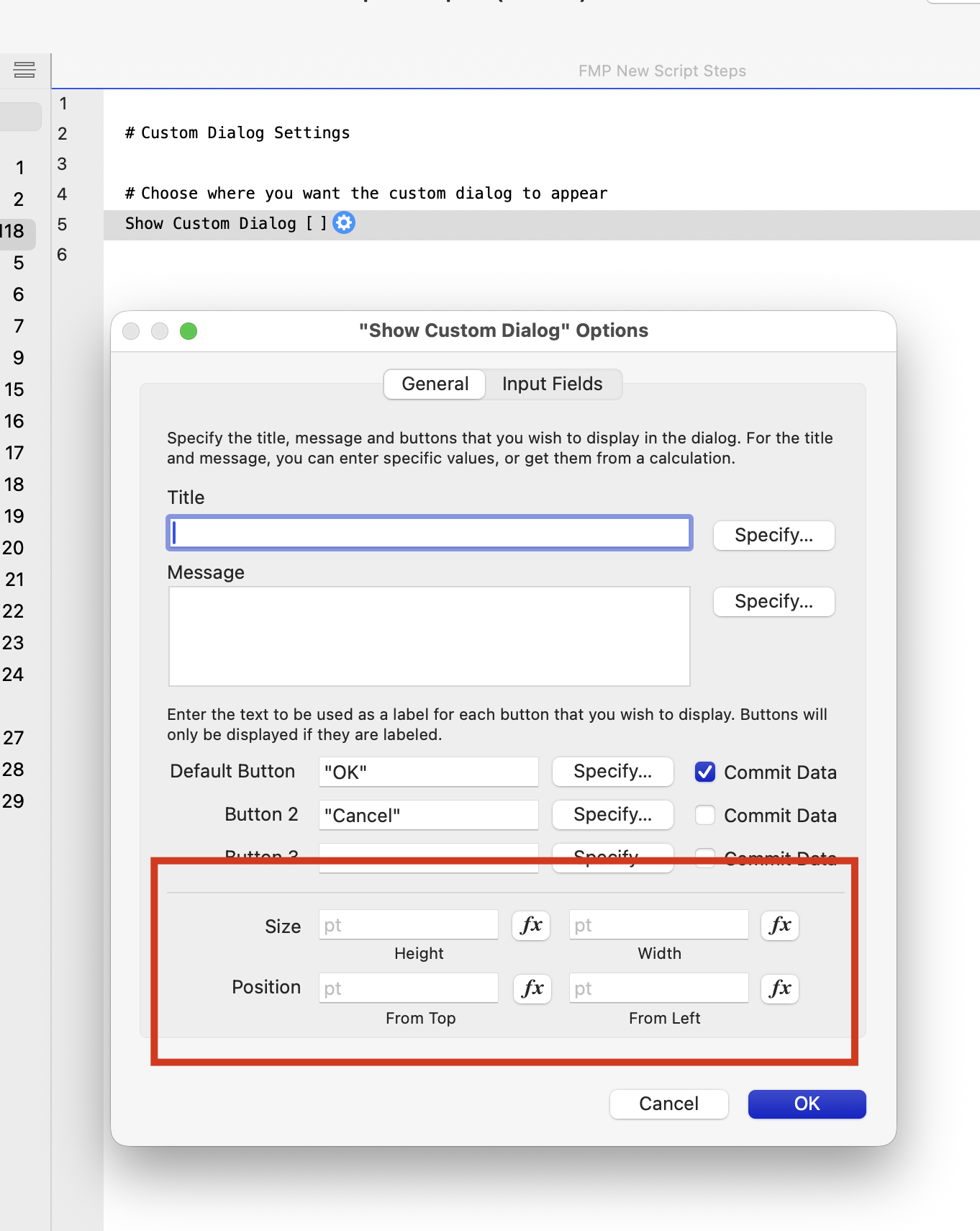
The script step parameters have been expanded to include absolute coordinate parameters, granting developers precision placement control over exactly where custom alert and inputs display across multiple display configurations.
Advanced Schema, Export, and Performance Controls
8. Base Table Comments and Advanced Field Output Mappings
Database schema design becomes much more descriptive and flexible with advanced Base Table Comments and field metadata tracking settings. Developers can now explicitly define exactly how specific data points behave when leaving the app. You can assign dedicated formatting, naming rules, and transformation calculations that dictate exactly how a field looks and behaves during native File Exports, Sort configurations, and schema reflections, abstracting the raw storage layer from downstream data consumers.
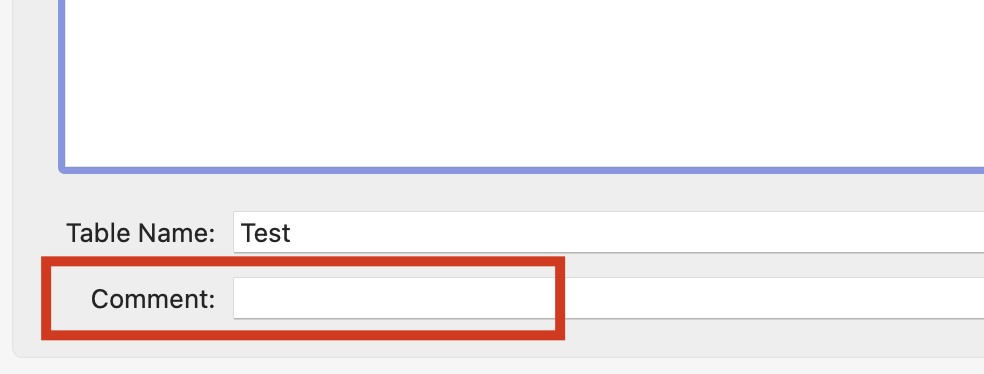
Adding a comment to your table does not only help colleagues, but can also help AI features.

The advanced options on fields will be a useful tool for staying true to your naming convention, but still have reasonable field names on export
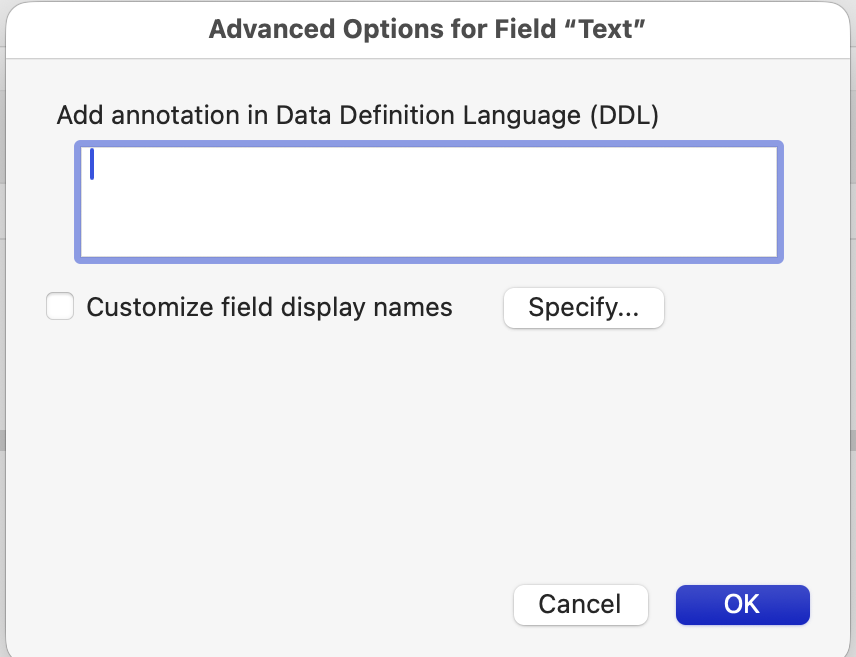
The advanced options for fields offer the options of adding an annotation in DDL or to customize field display names on four levels.
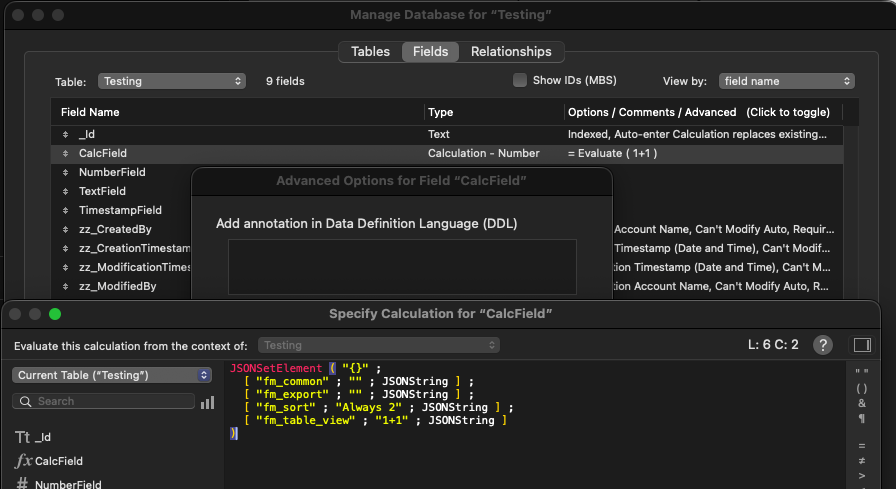
You can easily set custom display names by using a JSONSetElement. If no value is entered, the default field name is used.
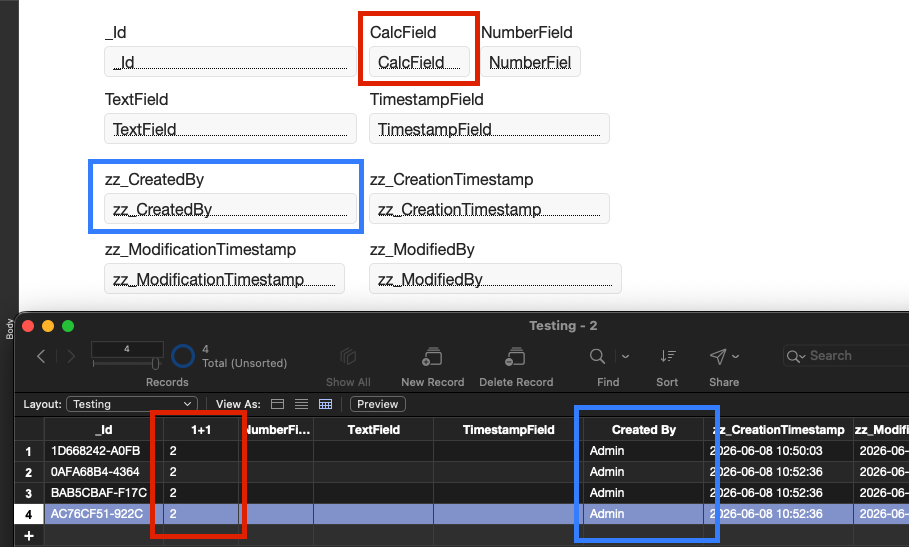
An example of the result using custom field display names in a table view, with the original field name still intact in layout mode.
9. Smart Sorting: Native Option to Sort Blank Records Last
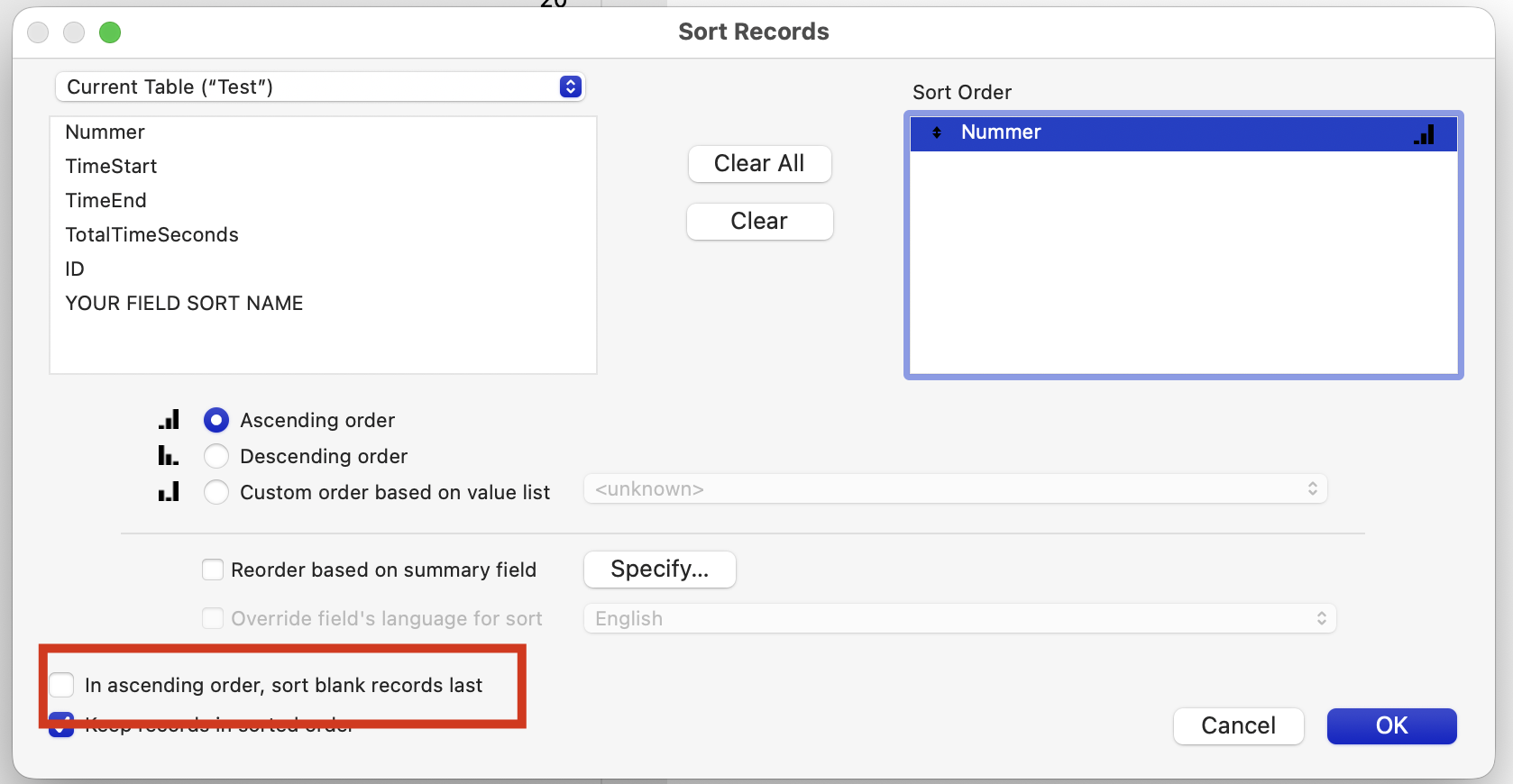
When sorting database records in ascending order, FileMaker’s legacy engine rule has always placed empty or unpopulated values at the very top of the list. Working around this behavior required developers to implement auto-entering fallback fields or write multi-criteria sort logic to filter blanks out. The updated Sort Records dialog introduces a handy UI checkbox option: ”In ascending order, sort blank records last”. Toggling this parameter guarantees that your clean, populated dataset remains positioned at the top of your layout workspace, while incomplete or empty entries are relegated to the end of the found set.
10. File Options: Disabling Default Field Injection
By default, the application automatically appends an integrated set of database tracking fields (Primary Key, Creation Timestamps, Account tracking, and Modification metadata) every time a new table schema is defined. While helpful for rapid prototyping, advanced development teams often prefer utilizing their own globally standardized corporate UUID or modification tracking systems.
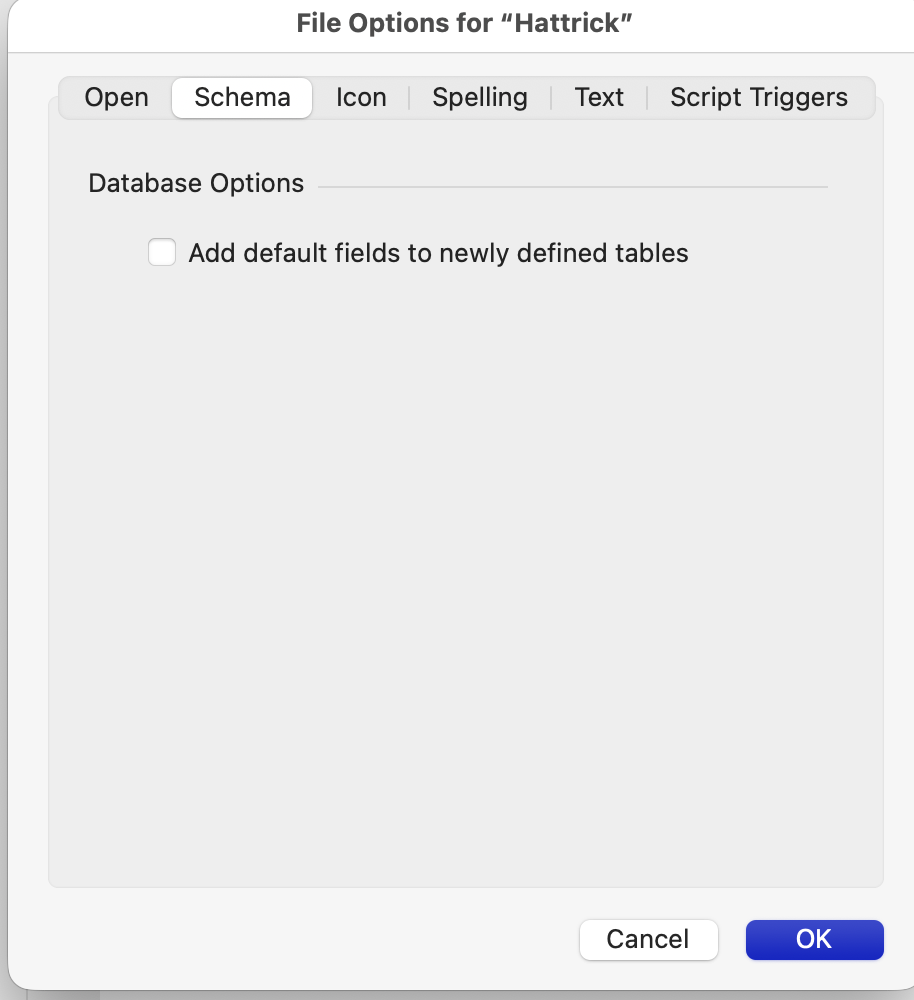
Under File Options -> Schema, a global file switch has been integrated: ”Add default fields to newly defined tables”. Disabling this option restores the classic, blank-canvas behavior, enabling you to map customized table schema patterns directly without wasting development time manually deleting standard fields on every new entity.
Script Workspace and Calculation Enhancements
11. Code Block Management: Collapsible Script Workspace Steps
Managing large, enterprise-grade logic trees just became much cleaner. The Script Workspace now supports fully collapsible script blocks for conditional workflows and multi-step logic paths, including If / Else If / End If, Loop / End Loop, and Set Error Logging blocks. This features relies on two distinct visual states that developers can toggle seamlessly.
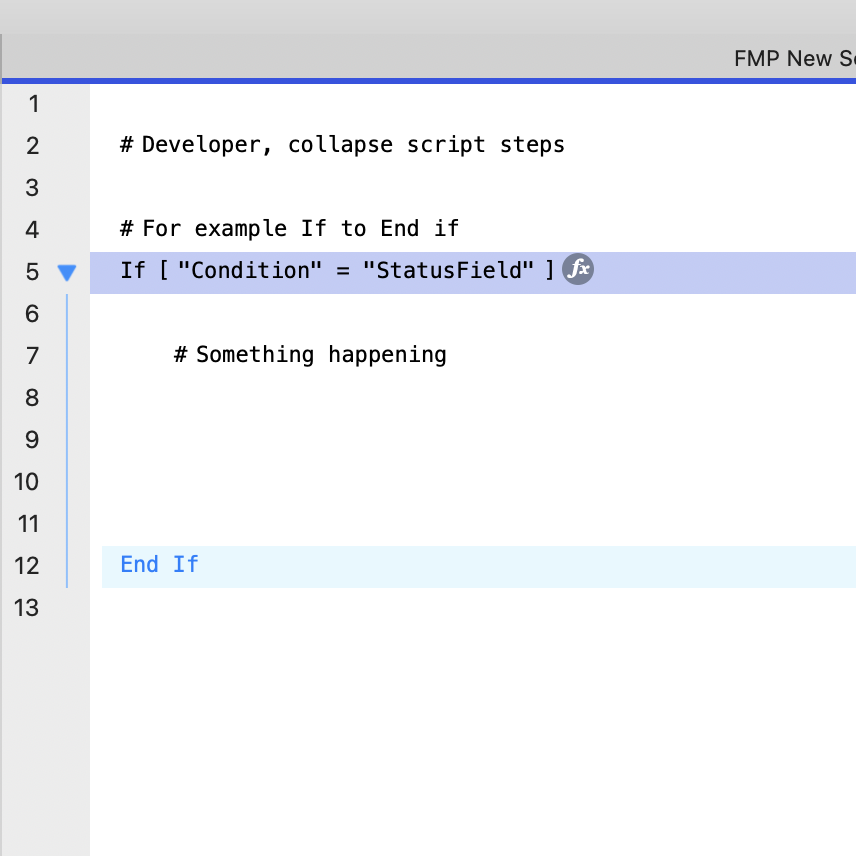
State A (Expanded): When expanded, a structural vertical blue guide-line down the gutter maps out the boundaries of the execution block. This gives clear visual cues indicating exactly where nested logic paths sit relative to parent loops and statements, making code walkthroughs easier.
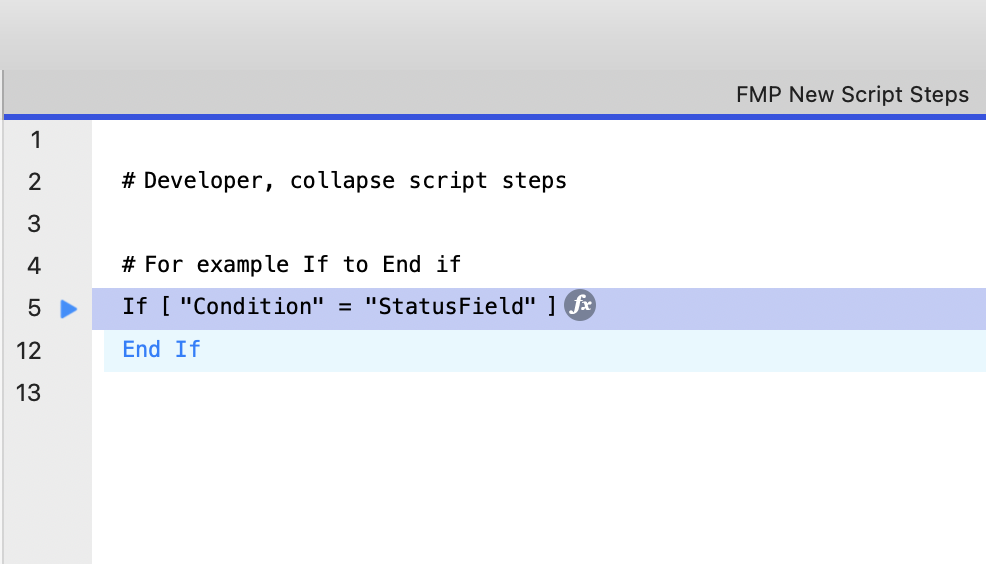
State B (Collapsed): When collapsed, the contents inside are neatly hidden away. This is visually represented by a right-facing triangle arrow toggle on the starting index line and an intentional gap in the line numbering sequence (for instance, jumping straight from line 5 to line 12). This structural consolidation drastically reduces vertical scrolling and improves readability during extensive code reviews.
12. Fetching Related and Filtered Portal Record IDs
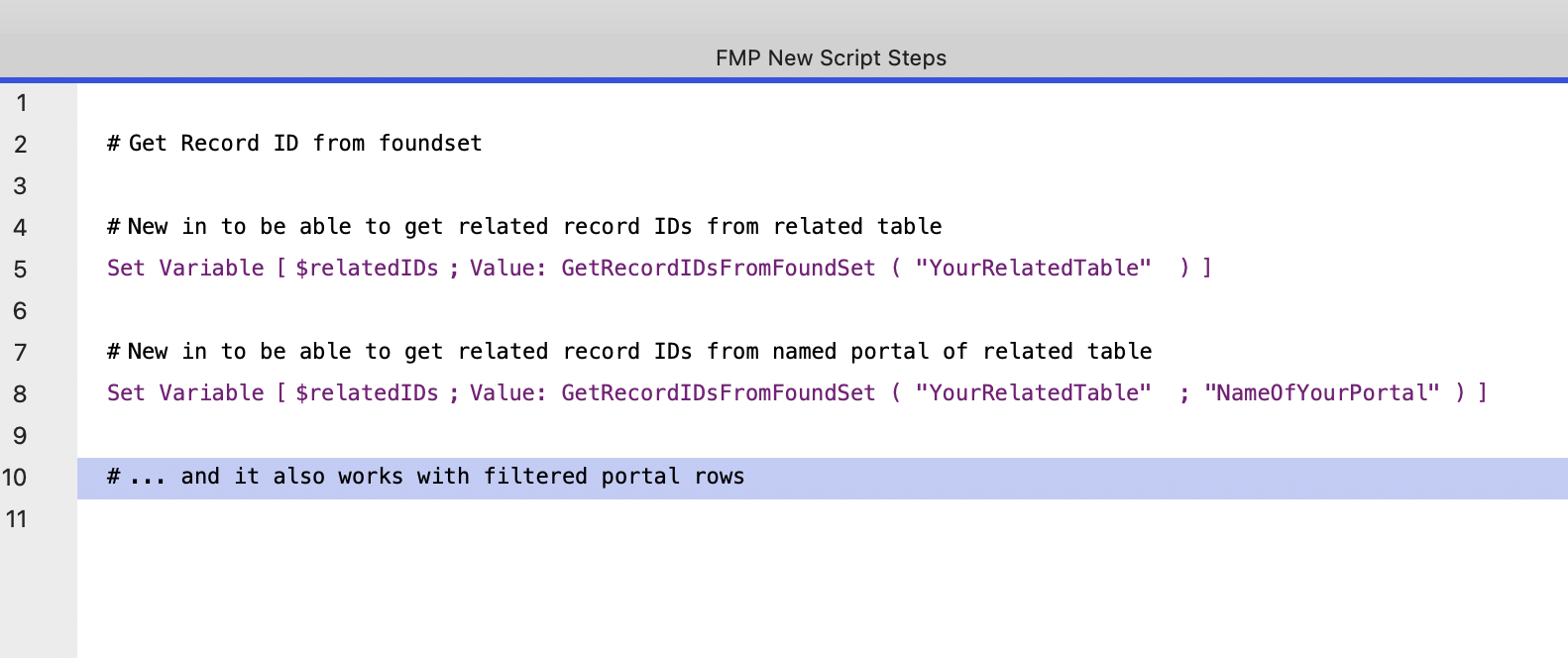
Historically, gathering record IDs from a found set or an active portal required complex custom looping scripts, virtual lists, or writing intricate List() calculations across the relationship graph. The newly introduced native calculation function GetRecordIDsFromFoundSet greatly help this process. Developers can now instantly fetch a clean list of record IDs directly from a related table occurrence. Alternatively, you can pass an optional portal object name parameter to target a specific portal layout instance. Crucially, this function natively respects portal filtering, returning only the IDs currently visible to the end-user in real time. This eliminates a lot of redundant scripting and accelerates performance for multi-record reporting, API payloads, or batch processing tasks.
13. Structural Folder Management for Custom Functions
While folders previously allowed you to organize your Custom Functions, FileMaker Pro 2026 restores the sorting feature with a much-needed smart hierarchy.
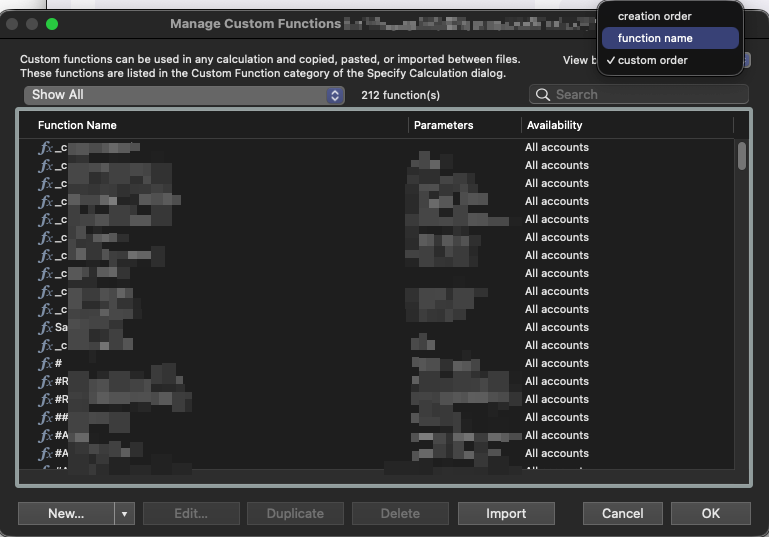
You can now sort functions by name, creation date, or custom order directly from the Manage Custom Functions dialog. Crucially, this sorting applies independently at each individual folder level.
Subfolders maintain their own unique sorting order without flattening your folder hierarchy. This makes it significantly easier for multi-developer teams to standardize organization conventions, distribute structured function libraries, or audit large legacy solutions by sorting by creation date to find old code.
14. Native Persistent Data Store Cache Engine
Another major optimization mechanism introduced in this release is the native, structured persistent data cache engine. Rather than managing complex session caching variables via global text fields, unstable global variables (which clear automatically on file close), or writing thousands of temporary records to scratchpad databases, developers can interact with a optimized, engine-level persistent cache layer. This architecture is defined across two key parameters during script assignment.
Configuration and Instance Scopes: The ”Configure Persistent Data” script options step allows developers to define a target entry name (such as PersistentData) along with a specific Instance ID. This allows developers to isolate unique operational contexts safely across windows or users.
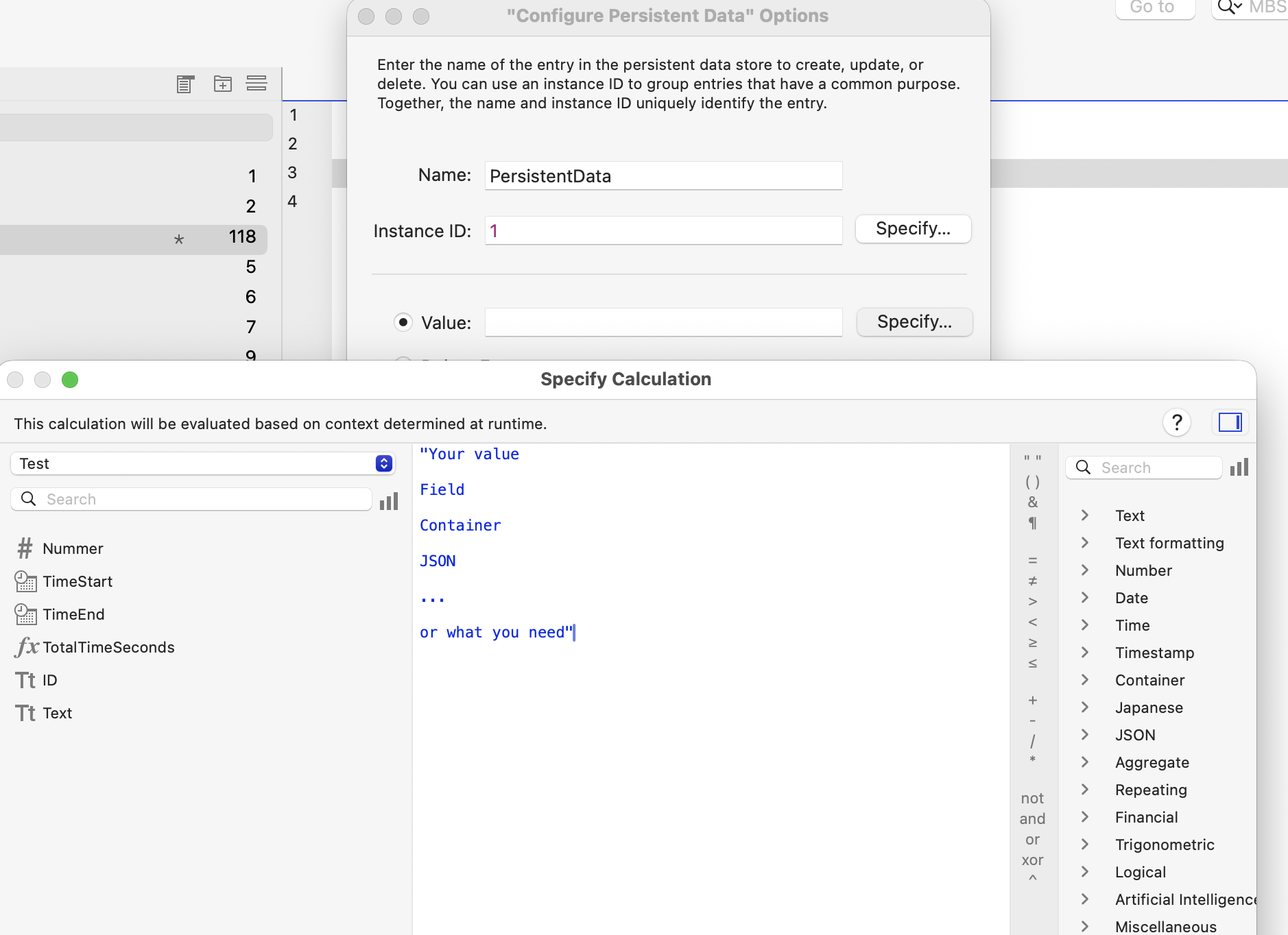
Advanced Target Calculation Architecture: Through the calculation engine panel, developers can load complex text variables, container objects, JSON blocks, or specific database field states natively into that cache layer. This tool redefines session state caching, multi-window synchronization, and local system preference tracking for complex deployments.
Security, Outputs, and Performance Upgrades
15. Granular Schema Privileges for Sub-Administrators
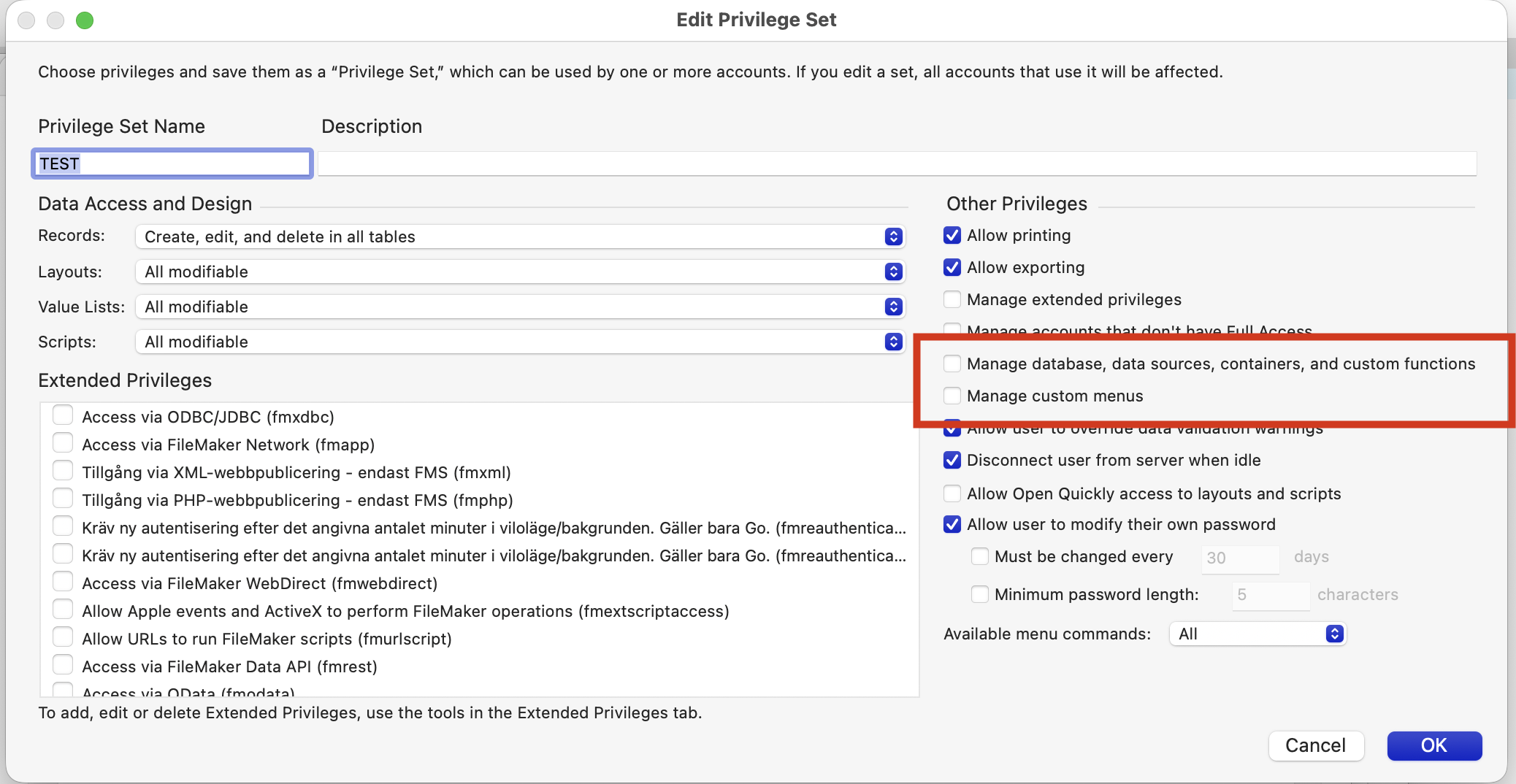
In co-development environments or large enterprise deployments, granting absolute ”Full Access” accounts to internal IT administrators or secondary developers introduces unnecessary operational and security risks. FileMaker addresses this with refined Other Privileges validation rules inside custom Privilege Sets. You can now explicitly permit non-Full Access accounts to specifically ”Manage database, data sources, containers, and custom functions” as well as ”Manage custom menus”. This allows sub-administrators to safely construct schema changes, map external integrations, and maintain business computations without granting them dangerous access to full account security models or data purge controls.
16. Native PDF Core Engine Rendering Improvements
Generating reports, handling complex layout typography, and compiling intense layout elements into document outputs receives a major behind-the-scenes boost. FileMaker 2026 introduces a rewritten and optimized internal PDF core engine.
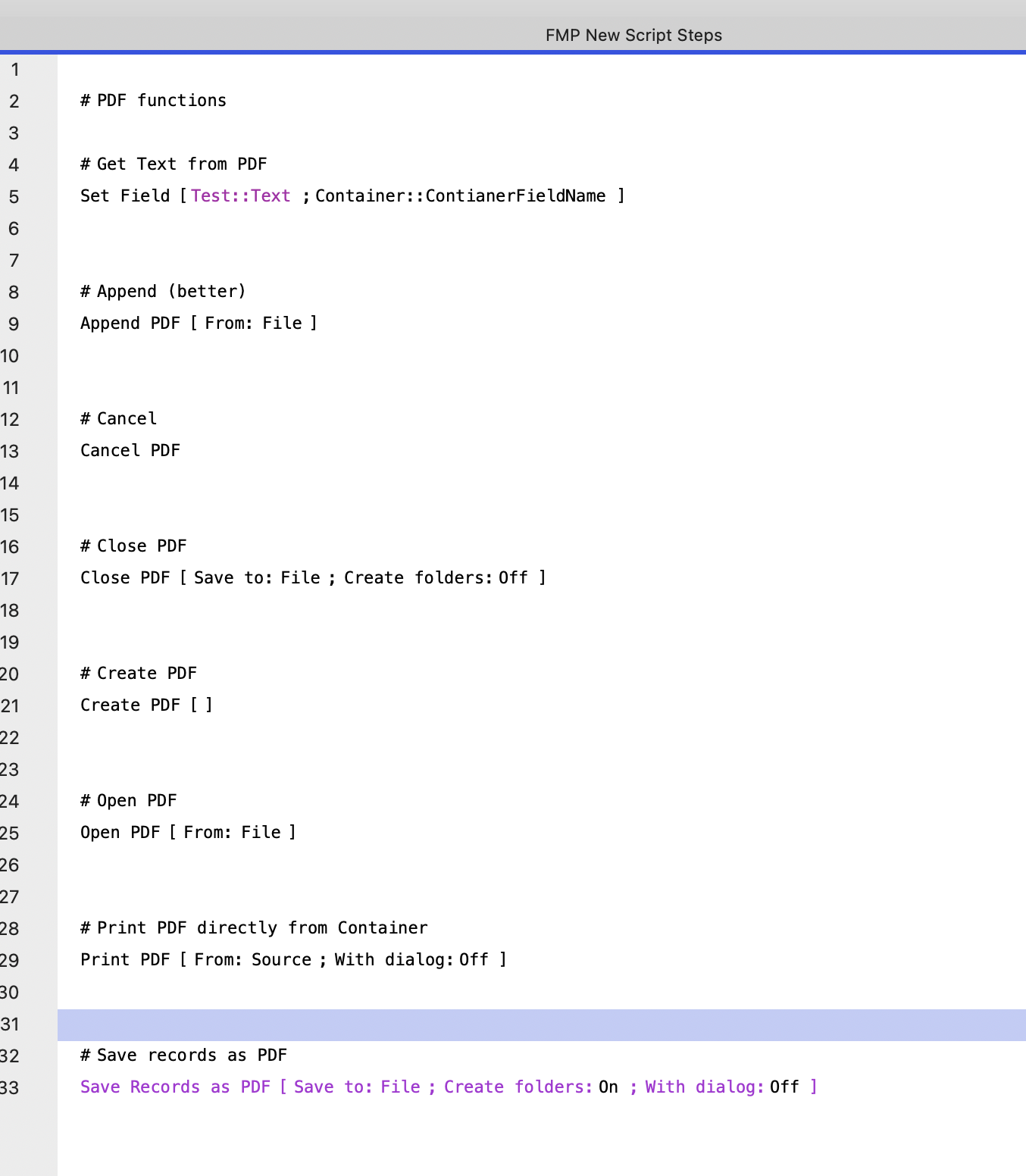
This performance upgrade accelerates document compilation speed, reduces temporary disk overhead caching, and ensures pixel-perfect vector accuracy for multi-page data reporting and professional invoicing runs.
Empowering Modern FileMaker Architecture
These features highlight Claris’s ongoing commitment to professional-grade development paradigms. By reducing administrative friction, granting deeper access controls, expanding native computational functions, and offering robust version control frameworks, FileMaker Pro 2026 allows Square Moon to engineer faster, more secure, and more scalable custom web and desktop solutions for our clients.
Are you looking to optimize your existing FileMaker deployment or leverage these new capabilities? Contact us at Square Moon to discover how we can assist with your next project.
